
YouTube AI upscale feature brings old videos to life in stunning 4K

TL;DR

YouTube’s new AI upscale feature—officially called Super Resolution—automatically enhances low-quality videos up to 4K resolution using artificial intelligence. The update targets old or SD uploads, improving playback on big screens while giving both viewers and creators full control over when to enable it.


YouTube’s Big AI Move: Super Resolution Explained

According to the YouTube Blog, the new Super Resolution feature aims to bring AI-powered upscaling to 4K for older videos.

The YouTube AI upscale feature is one of the biggest updates the platform has introduced in recent months. It uses advanced AI models to automatically improve video resolution for older or low-quality content, turning even 480p or 720p videos into high-definition visuals.

The system works by analyzing each frame, identifying missing visual data, and intelligently filling in those details to generate a sharper, smoother version of the same video. YouTube says this AI-enhanced process doesn’t just stretch pixels—it recreates lost textures and edges for a cleaner, more natural look.

Initially, the YouTube AI upscale feature will enhance videos under 1080p to full HD. However, YouTube has confirmed plans to extend the feature to 4K resolution in the near future, taking old, blurry uploads and giving them new life for modern screens.


How the AI Upscaling Works

Unlike traditional upscaling, which simply enlarges images, YouTube’s Super Resolution uses machine learning to rebuild missing details. The AI model processes the video in real-time and outputs a higher-quality version tagged as Super Resolution in playback settings.

  • The feature activates automatically on compatible smart TVs and set-top boxes like Roku and Nvidia Shield.

  • For now, it’s limited to these devices, but a mobile and desktop rollout is expected soon.

  • Viewers will be able to toggle between the AI-enhanced version and the original quality.

YouTube clarified that creators will retain full control. They can opt out of the feature, ensuring their videos remain untouched if they prefer the original upload quality. Similarly, viewers can disable the AI enhancement in playback settings if they want a “true-to-original” experience.
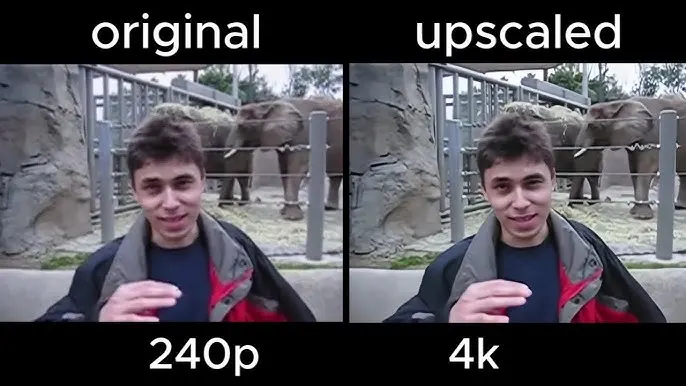
YouTube AI upscale feature

Why the AI Upscale Feature Matters

YouTube turned 20 this year—and that means millions of legacy videos are still stuck in standard definition. While nostalgic, most of them look outdated on modern displays. The YouTube AI upscale feature could change that, breathing new life into classic clips and older creator content without requiring any re-uploading.

For creators, this is huge. Instead of remastering or re-editing old videos, the AI system does the heavy lifting. It could help long-time YouTubers gain renewed engagement on older content that previously looked too grainy for 4K TVs or newer smartphones.

For viewers, this means sharper visuals, reduced blur, and improved viewing comfort—especially on large screens.


Creator Control and User Experience

One of the best aspects of this YouTube AI upscale feature is the transparency. YouTube ensures that creators always have control over their work. The original video file remains untouched, and the platform simply adds an AI-enhanced stream for playback.

  • Creators can opt out anytime.

  • Viewers can switch off AI enhancement through video settings.

  • The upscaled version will appear with a “Super Resolution” label, so users know when AI is active.

This balance between automation and creative freedom makes the rollout more trustworthy. YouTube also plans to bring the same system to mobile, letting smartphone users enjoy better video clarity on smaller screens.


YouTube’s Wider AI Push

The YouTube AI upscale feature is part of Google’s larger AI strategy. Over the past few months, YouTube has rolled out AI-generated video summaries, thumbnail enhancements, and even AI tools for creators—like topic suggestion and voice-dubbing in multiple languages.

Alongside Super Resolution, YouTube has:

  • Increased thumbnail file size limits from 2 MB to 50 MB.

  • Added new AI shopping tools using QR codes.

  • Introduced early beta AI features for creators, including smart tags and editing assistance.

Together, these updates show YouTube’s push to make the platform more automated, intelligent, and user-friendly.


A Realistic Take: What to Expect

While this all sounds impressive, AI upscaling isn’t perfect. It’s not the same as remastering from original footage; instead, it’s a smart digital enhancement. Poorly compressed videos or low-bitrate uploads may still show artifacts or halos.

Still, when implemented well, it can deliver a noticeable improvement—especially for older videos that never had HD versions. It’s also encouraging that YouTube isn’t replacing originals, which avoids quality loss or distortion.


Final Verdict

The YouTube AI upscale feature is one of the platform’s most meaningful updates in years. It modernizes billions of old videos, improves user experience, and lets both creators and viewers stay in control.

If YouTube manages to deliver clean, artifact-free upscaling and eventually expand to 4K across all devices, this could mark a massive leap in how we experience older content online. It’s AI done right—quietly powerful, user-respecting, and practical for everyone.


M5 MacBook Pro review: exceptional performance leap or minor upgrade?

TL;DR

This M5 MacBook Pro review shows that while the design is almost identical to the M4, the leap in storage speed, graphics power, and on-device AI performance makes it a much bigger generational upgrade than it first appears. For Intel and M1 users, it’s a massive step up. For M4 owners, the improvements are noticeable only in heavier workloads and future AI use-cases — not in everyday app usage.

M5 MacBook Pro review

The base model M5 MacBook Pro continues Apple’s trend of subtle exterior changes paired with major internal upgrades. The chassis, weight, and overall industrial design are unchanged from the previous generation, but under the hood everything feels tighter, faster, and more future-proof. This M5 MacBook Pro review focuses less on surface-level details and more on how the new silicon actually changes the day-to-day experience.

The first meaningful upgrade is memory. Apple has permanently removed the 8 GB base configuration — the entry model now starts at 16 GB unified memory and 512 GB storage. This single change already makes the M5 more useful for pro-workloads out of the box, especially for anyone coming from an M1 Mac with 8 GB. The pricing remains unchanged at $1599 in the US, which gives this generation an immediate advantage in long-term value.

Display quality remains a major highlight. The Mini-LED panel with 120 Hz ProMotion still delivers arguably the best laptop screen on the market, with deep contrast and serious HDR performance. Peak brightness at 1600 nits makes bright environments a non-issue. Apple also continues to offer the nano-texture option for people working in glare-heavy studios. Throughout this M5 MacBook Pro review, the display quality continues to feel like a big differentiator compared to both the Air and competing Windows laptops.

Thermals are another area where the M5 pulls ahead. Under sustained workloads, the M4 sometimes climbed toward the thermal ceiling, while the M5 holds performance more confidently with less fan ramp. It’s not silent during sustained load, but it is calmer, and the heat spread across the chassis feels more controlled. This is one of the first visible signs that the chip is designed for longer sessions of real production work — a theme repeated throughout this M5 MacBook Pro review.

Where this generation really distances itself is storage speed. Apple appears to have doubled the internal SSD performance, and this instantly changes workflow-heavy use cases — backups, RAW imports, and even complex app installs feel dramatically quicker. This is a real-world gain you can feel immediately, not one that only exists in benchmarks. For people editing large media libraries or pulling big files on the go, this isn’t a spec sheet detail — it’s a time saver.

M5 MacBook Pro review

The biggest forward-facing upgrade, however, is AI performance. Apple clearly built the M5 around upcoming local AI workflows. Neural acceleration has been boosted to the point where local model execution is now viable instead of experimental. AI image generation, transcription workloads, and edge-based LLM performance all point to a future where “cloud assist” becomes “on-device autonomy.” This M5 MacBook Pro review makes it clear that the hardware is being built ahead of the software Apple will ship over the next 12–18 months.

Battery life remains excellent, though mostly unchanged from the M4. Idle and light-use efficiency is slightly better, but Apple Silicon has already reached a point where battery complaints almost no longer exist in this category. The meaningful advantage here is that the M5 holds peak performance without compromising endurance — something Intel laptops still can’t pull off.

For upgraders, the summary is straightforward:

  • Intel → M5 = night and day

  • M1 → M5 = massive leap

  • M2 → M5 = significant

  • M3 → M5 = noticeable if you use heavy workloads

  • M4 → M5 = only worth it for AI or pro apps

Ports and connectivity remain mostly unchanged, with Thunderbolt 4, HDMI 2.1, SD card reader, MagSafe, and a headphone jack. The one disappointment is the absence of Wi-Fi 7 and Bluetooth 6, both of which the M5 iPad Pro already offers. For a laptop marketed toward longevity, that omission stands out, and it’s one of the few parts of this M5 MacBook Pro review where the hardware feels behind the rest of Apple’s lineup.

Repairability remains the same — RAM and storage are soldered, which means buyers need to commit to their configuration at purchase. For most professionals, external Thunderbolt storage is still the smarter upgrade path than paying Apple’s internal storage premiums.

Final Verdict

The verdict of this M5 MacBook Pro review is clear: this is a serious performance upgrade disguised as a mild refresh. The design stays familiar, but the jump in SSD throughput, GPU acceleration, sustained thermal behavior, and especially on-device AI performance makes the M5 far more future-ready than the M4. Not everyone will feel the difference today, but everyone will feel it tomorrow when local AI workflows become standard.

For Intel and early Apple Silicon users, the M5 is a dramatic leap — a genuine “new machine” moment. For recent M4 owners, the upgrade is only justified if your work depends on AI or large file throughput. Either way, this generation cements Apple Silicon’s lead, and the M5 MacBook Pro remains the most capable pro laptop Apple has built so far.